Overview
Medical staff may deploy to austere environments after significant man-made or natural disasters. It has become even more important when working in these areas that a GPS messaging and SOS satellite device is carried on your person or with the team. The risk of being extorted, kidnapped, injured, or falling victim to other criminal activity has increased. Your GPS device needs the capability of sending communications and should be integrated into daily plans and operations. While these GPS devices will not mitigate your risk, which is a team responsibility, it is important to have the capability to communicate amongst your team and externally during emergencies.
Technology
There are several devices available from Garmin, Motorola, SPOT, ACR, and Zoleo. Differences between the devices include purchase cost, monthly service charge, coverage area, digital map software, message customization, battery life, and screen size. Try before you buy!
A good side-by-side device comparison with testing criteria is available here: The Best Satellite Messengers of 2024 (gearjunkie.com).

Garmin InReach and Garmin Mini-2 – Mexico 2024. (Mark Lopshire)
In the past few years, the teams I support have used the Garmin InReach and Garmin Mini-2. They are rugged, have SOS capability, good battery life, and are easy to operate. We use them primarily as an SOS locator beacon when moving between locations and upon arrival at a new location. The team typically uses the larger InReach because it has a larger screen, is easier to read, and is large enough so that it does not easily get lost. Others still enjoy the 3.4 oz weight of the Mini-2.
Device Capabilities and Lessons Learned
1. Satellite Interference
A GPS device needs clear skies to access three or four satellites in the GPS constellation. However, GPS accuracy may be degraded in canyons, industrial areas with tall buildings, during solar flares, or in heavily forested or jungle environments. In addition, the signal is degraded inside vehicles when traveling. While driving, an external antenna may be used or the device can be kept on the dashboard. Your GPS will not work while stored in your backpack or on the floor. Once the device has clear skies, it will generally take 3-5 minutes to obtain a good fix on your location.
2. Message/Signal Timing
Time to acquire a signal is dependent upon the device model and satellite access. If you need to immediately send a message, 3-5 minutes may be too long. Plan accordingly. Maintain access to your device. Upon arrival at a location, I recommend carrying your device on the outside of your backpack. Not every GPS is perfect for every situation. A GPS device that is great for hiking at two miles per hour may be adequate to maintain your location. In a vehicle, your location is dependent on how often the device updates. If you are traveling 40 miles per hour and your device sends an updated location every 20 minutes, your vehicle could be 10 or more miles away from your last known location if there is an incident.
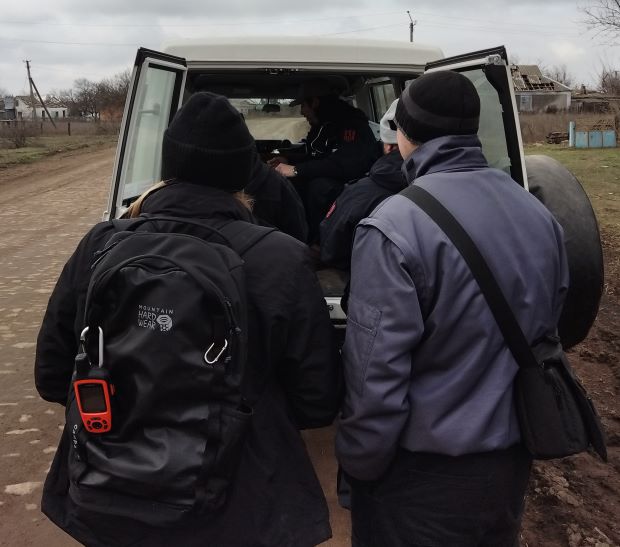
Medical Team in Kherson Region, Ukraine with GPS attached to backpack. (Mark Lopshire)
3. SOS Messaging
The SOS button on the InReach device has a cover. When they were first on the market, some devices did not have a protective SOS button cover. On occasion the button was accidently pushed and panic ensued. Now you must remove the cover to push the SOS button. A message on the screen will generally ask if you are sure that you want to send the message. I have had my hand on the “SOS panic button” only once. In Ukraine, our driver and interpreter took a wrong turn. Down the road, there was a roadblock with sand bags and razor wire. In addition, there were three men in civilian clothes with AK-47 rifles pointing in our general direction. They ordered the driver out. I was in the back seat holding the InReach near the window searching for satellites. The men, who were locals from the village, eventually identified us and a few minutes later they shook our hands and we were on our way. Follow your established protocols before you push the button and request emergency help. Pay attention to the SOS button and device location!
4. Battery Life
Keep the battery full. When you are in a fixed location, plug the GPS into the required power source. Check the device and country’s power outputs before deployment. Often devices are not plugged in and the battery is at 50%. All devices should have an associated battery pack/power bank that is always fully charged. Anker power banks are excellent and rugged. Goal Zero, BioLite, and others are also available.
5. Travel logistics
Remember that when travelling through airports, lithium battery power banks should be in checked baggage. There have been a few power banks “donated” to the local airport security teams before boarding flights when found in carry-on backpacks. Small portable solar panels have also been carried to charge the GPS devices, however, can be dependent on environment and weather. In Ukraine, when the conflict began in late February 2022, we spent over 60 days in a large, dark, and cold underground parking lot that served as the medical hospital and bomb shelter. So- no sunshine, no solar power, and no charging.
6. Additional tidbits
Have a backup plan. Life happens. If your GPS quits working, cycle the power off and back on. As a back-up, use a map, compass, and maybe a watch with GPS. Know how to read coordinates on your watch and find your location on a map. In areas of conflict or natural disasters, cell phone towers may be non-operational or non-existent. In Turkey after the February 6, 2023 earthquakes (7.8 and 7.4 magnitude) there were no cell towers available in the southwest part of the country. In conflict zones cell phone towers are often the first to be destroyed.
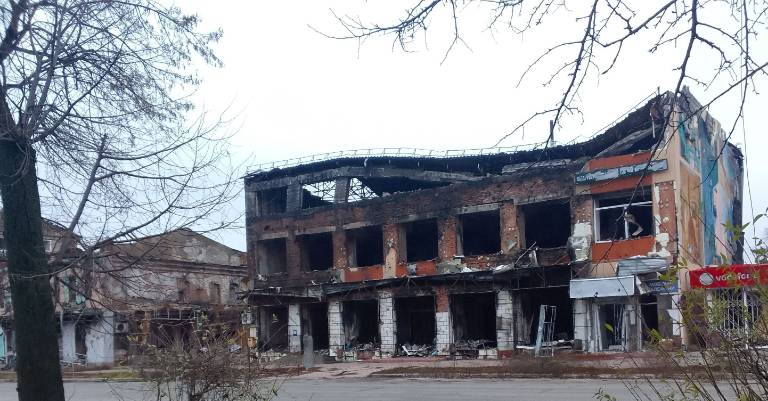
No cell towers in Izyum, Ukraine, where our facility was located, InReach satellite access was a top priority. (Mark Lopshire)
There is a monthly cost to access GPS satellites. It is generally monthly or an annual contract. Pricing for individual devices ranges from about $15 to $65 per month.
Read the instructions. They might surprise you. In Kropnyvinsky, Ukraine, we had a two-vehicle mobile medical team caring for internally-displaced populations. It was a challenging communications environment if one of the vehicles made a wrong turn. One of our nurses read the manual. She discovered that we could text between the vehicles. These devices have more technology than we realize.
Where are you going? Does your device have global maps? Are they easy to read on the small screen under variable sunlight conditions. You may need that digital map of Armenia, Yemen, or South Sudan.
In conclusion, there are a number of very good GPS devices with messaging and SOS capabilities that have reasonable prices for the devices and monthly satellite access fees. To be safe when working in an austere overseas environment, we need to have established protocols, multiple means of communication, and trained staff to send SOS messages and communicate during an emergency. Keep our teams safe.